


SR-NIEL tables are available in the latest version of test58. The NIEL calculation using tables is handled by two classes:
- G4NIELProcess: Retrieves the particle kinetic energy, material, and step length during particle transport. It reads the corresponding SR-NIEL table, interpolates the NIEL value, and calculates the non-ionizing energy contribution for each step. This process is used only for scoring and does not modify particle transport or energy.
- NIELManager: Manages the SR-NIEL tables, collects the contributions calculated by G4NIELProcess, and produces the final summary report. It also allows the user to select which geometry volumes are enabled for NIEL scoring.
The following instructions explain how to modify the simulation based on test58, according to the user's needs.
How to configure your simulation
Follow these steps when adapting the code to a new incident particle, target material or geometry.
Step 1 – Download the SR-NIEL tables
Download the required NIEL tables from the SR-NIEL Tables generator.
Select the tables corresponding to:
- The incident particle (proton, ion or electron)
- The target material used in your simulation.
Step 2 – Configure the table reference
Modify the reference/header row of each downloaded table according to the format expected by the code. Define the table file to be loaded in PhysicsList.cc, as in the following example for protons in silicon:
niel->LoadTable("proton", "G4_Si", "filename.dat");
Place the downloaded tables in the directory used by the test58 application and modify filename.dat to match the name of the downloaded file.
Step 3 – Check the geometry and materials
Verify that the target material is correctly defined in the Geant4 geometry.
The material name used by the geometry must match the material identifier associated with the corresponding NIEL table.
For example, a table associated with G4_Si requires the corresponding silicon material in the geometry. In test58, the absorber material can be defined in the macro file as follows:
/testem/det/setAbsMat G4_Si
Step 4 – Enable the volumes for NIEL scoring
The user explicitly selects which logical volumes will be included in the NIEL table calculation.
In DetectorConstruction.cc, after creating the logical volume to be scored, enable it with:
auto logicAbsorber = new G4LogicalVolume( solidAbsorber, absorberMaterial, "Absorber" );
NIELManager::Instance()->EnableVolume(logicAbsorber);
Only volumes enabled through EnableVolume() are considered by G4NIELProcess.
Important: Volume selection is based on the G4LogicalVolume pointer. If the same logical volume is placed multiple times in the geometry, all of its placements are enabled for scoring.
SR-NIEL table summary
A table summary is produced by the NIEL scoring system at the end of a Geant4 simulation. It provides information about the simulated volume, the material and particle considered, the SR-NIEL table used for the calculation, and the resulting quantities.
Following is an example of output table:
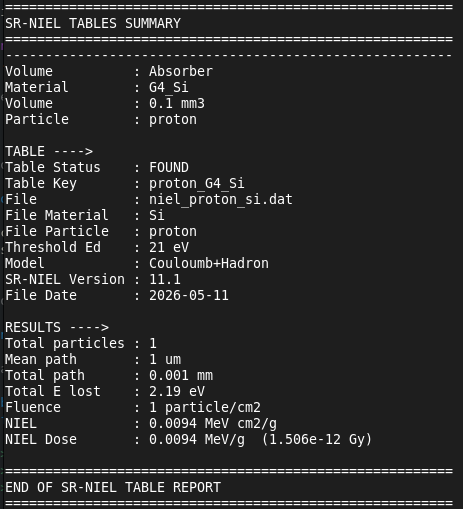
Here is the description of the table items:
| Field | Description |
| Volume |
Name of the Geant4 volume in which NIEL scoring is enabled. In this example, the scoring volume is Absorber. |
| Material | Name of the Geant4 material assigned to the scoring volume. Here, G4_Si identifies silicon. |
| Volume (mm³) | Geometrical volume of the scoring region. This value is used, among other quantities, to calculate the fluence. |
| Particle | Particle species considered by the NIEL calculation. In this example, the incident particle is a proton. |
| Table Status | Indicates whether a suitable SR-NIEL table has been found and successfully associated with the selected particle and material. FOUND means that the required table is available. |
| Table Key | Internal identifier used by the application to retrieve the corresponding table. It is generally constructed from the particle and material names. |
| File | Name of the SR-NIEL data file used for the calculation. In this example: niel_proton_si.dat. |
| File Material | Material identifier specified in the table metadata. It can differ from the Geant4 material name; for example, Si in the file corresponds to G4_Si in Geant4. |
| File Particle |
Particle species specified in the SR-NIEL table metadata. It should be consistent with the particle selected for the simulation. |
| Threshold Ed | Displacement threshold energy used in the NIEL calculation, expressed in eV. In this example, the value is 21 eV. |
| Model | Physical model or combination of models indicated in the table metadata. Here, Coulomb+Hadron identifies the models used to calculate the tabulated NIEL values.. |
| SR-NIEL Version | Version of the SR-NIEL calculation or database associated with the table. |
| File Date | Date associated with the table file, as reported in its metadata. |
| Total particles | Number of particles counted by the scoring system in the selected volume. The current code counts only primary particles that enter the volume. |
| Mean path | verage path length per counted particle in the scoring volume. |
| Total path | Sum of the particle track lengths inside the scoring volume. Only the portion of each step within the scoring volume contributes to this sum, including steps that cross the volume boundary. |
| Total E lost | Total energy lost by particles during transport within the scoring volume, as accumulated by the simulation. This is an energy-loss quantity and should not be confused with the non-ionizing energy deposited (NIEL). |
| Fluence | Particle fluence estimated from the accumulated track length and the scoring volume. For a track-length estimator, it is calculated as the total track length divided by the volume, resulting in units of particles/cm². This is not necessarily equal to the incident beam fluence, which is typically calculated as the number of incident particles divided by the irradiated area. |
| NIEL | Average non-ionizing energy loss obtained from the SR-NIEL table, expressed in MeV·cm²/g. It represents the non-ionizing energy loss per unit mass thickness, evaluated over the particle tracks considered by the scoring system. |
| NIEL Dose | Non-ionizing energy deposited per unit mass, expressed in MeV/g. It is obtained from the accumulated NIEL contribution normalized to the mass of the scoring volume. The equivalent absorbed dose is also reported in Gy. |
Adding other physics processes
The NIEL calculation does not replace Geant4 physics processes. Users can freely add or modify electromagnetic, hadronic, decay, and other physics processes according to their simulation requirements.
These processes determine particle transport and energy loss, while G4NIELProcess independently evaluates the NIEL contribution using the tabulated data.
Important: a NIEL table must be available for every particle/material combination that the user wants to score in the enabled volumes.